Summary
- Introduction about HTML and the Web
- A simple HTMX demo
- A basic Chat with HTMX and FastAPI
- A more advanced chat with Streaming and Server-Sent Events
- An agentic chatbot with Gemini and ADK
- Conclusion
Introduction
I remember there was a time, long ago, when building websites was easy. HTML and CSS. It felt simple. Nowadays, Javascript frameworks are everywhere. Relentless change, increasing complexity. This phenomenon is called “Javascript Fatigue” and is all about developers exhausted by chasing the latest frameworks, build tools, libraries, and trying to keep the pace. But with HTMX, developers now have a way to build engaging web applications with greater simplicity and less burnout — and without all the JS hassle.
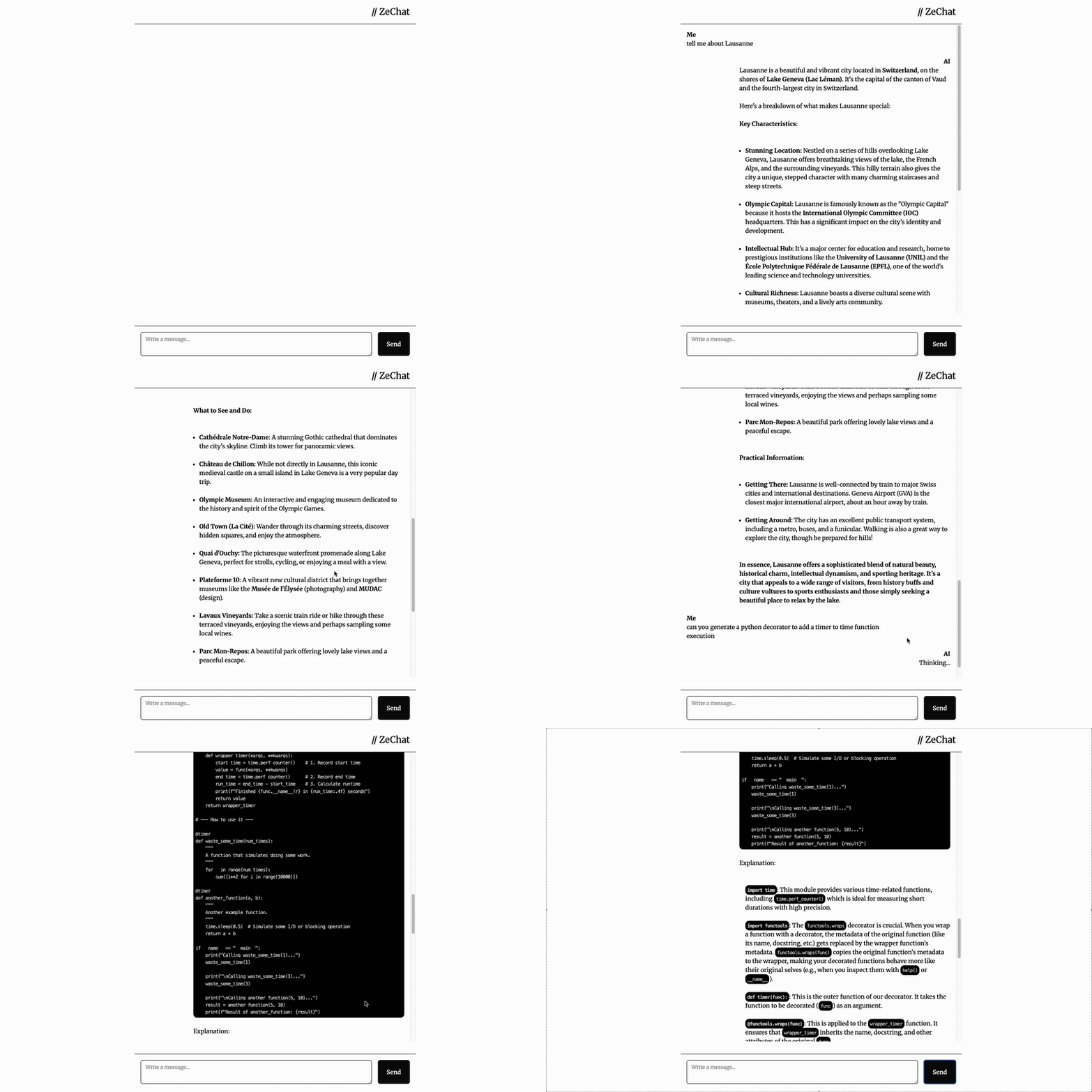
And by engaging web applications, I mean something like ChatGPT, in less than 200 lines of code, pure Python and HTML. Like this one:
A quick refresher on how the Web worked
When Tim Berners-Lee created the first web page in 1990, the system he designed was mostly a “read-only” system, that would lead to pages connected between themselves with hyperlinks, which we all know as anchor tags in HTML. HTML 1.0 was therefore relying on one single tag and offered simple navigation between pages.
<!-- The original web: simple hypermedia -->
<a href="/about">About Us</a>
The anchor tag is a hypermedia control that does the following process:
- show the user that this is a link (clickable)
- issue a GET request to the hyperlink URL
When the server responds with a new page, the browser will replace the current page with the new page (navigation)
Then came Web 2.0 which introduced a new tag, the form tag. This tag allowed to update ressources in addition to reading them via the <a> tag. Being able to update ressources meant that we could really start building web applications. All of this with only two controls: <form> and <a>.
<!-- Web 2.0: now we can update data -->
<form method="POST" action="/login">
    <input type="email" name="email" required>
    <input type="password" name="password" required>
    <button type="submit">Login</button>
</form>
The process when submitting a form is quite similar to the anchor tag, except that we can:
- choose which kind of request we want to perform (GET or POST)
- attach user information like email, password, etc. to be passed with the request
The two tags are the only elements, in pure HTML, that can interact with a server.
And then came Javascript.
JavaScript was originally created to add simple interactions to web pages: form validation, data fetching, and basic animations. But with the introduction of XMLHttpRequest (later known as AJAX), JavaScript evolved into something much more powerful and complex.
With AJAX, developers could now trigger HTTP requests without the two tags. AJAX allows fetching data from the server, and though XHR can fetch any type of data — including raw HTML fragments, text, or XML — JSON became the de facto data exchange format.
This means there needs to be an additional step where JSON gets converted to HTML, via a function that renders HTML from JSON. As shown in the example below, we proceed by:
- fetching JSON data from the
/api/usersendpoints (theresponse => response.json()part) - inserting this data into a HTML templates (the
const htmlpart) - that will then be added to the DOM (the
document.getElementById()part)
// The JavaScript way: JSON → HTML conversion
fetch('/api/users')
    .then(response => response.json())
    .then(users => {
        const html = users.map(user =>
            `<div class="user">${user.name}</div>`
        ).join('');
        document.getElementById('users').innerHTML = html;
    });
This rendering involves a tight coupling between the JSON data format and the HTML rendering: if the JSON data format changes, it breaks the HTML rendering function. This point is usually a source of friction between frontend and backend developers: frontend dev builds a UI based on an expected JSON format, backend dev decides to change the format, frontend dev needs to update UI, backend dev changes again, frontend dev changes again, etc.
Eventually, the industry pivoted heavily toward JSON-driven architectures, giving rise to Single-Page Applications (SPAs). We stopped building websites that navigated from page to page and started building software that lives entirely inside the browser. In this model, the server is reduced to a simple data API, while JavaScript handles the heavy lifting of state management and UI rendering. This is the engine behind React, Angular, and Vue — powerful, but complex.
Below are some thoughts from an excellent source which I encourage you to read so you can make your mind:
“The emerging norm for web development is to build a React single-page application, with. server rendering. The two key elements of this architecture are something like:
– The main UI is built & updated in JavaScript using React or something similar.
– The backend is an API that that application makes requests against.
This idea has really swept the internet. It started with a few major popular websites and has crept into corners like marketing sites and blogs.”(Tom MacWright, https://macwright.com/2020/05/10/spa-fatigue)
Most current SPA architectures are “client-thick” applications where most of the job occurs on the client-side and where the backend is merely an API returning JSON. This setup is known for providing snappy and smooth user experiences, but do we really need that complexity every time?
“(…) there are also a lot of problems for which I can’t see any concrete benefit to using React. Those are things like blogs, shopping-cart-websites, mostly-CRUD-and-forms-websites.”
(Tom MacWright, https://macwright.com/2020/05/10/spa-fatigue)
Javascript Fatigue is real
As the dominance of SPAs grew, so did the number of Javascript frameworks and the complexity associated to it. For developers, this profusion of choices, opinionated frameworks and libraries eventually led to a collective sense of exhaustion called “Javascript Fatigue”. Here are some reasons to this Javascript frameworks burn-out:
- Increasing complexity: Libraries and frameworks have become increasingly heavy and complex, requiring big teams to manage. Some opinionated frameworks also mean that JS developers have to specialize on one tech. No Python developer ever called themself “A Tensorflow Python developer”. They’re just Python developers, and switching from TF to Pytorch is not a problem.
- Tight coupling: The coupling between data APIs and the UI creates friction within teams. Breaking changes occur everyday, and there is no way to solve this as long as teams use JSON as their exchange interface.
- Framework proliferation: The number of frameworks keeps increasing, leading to a real feeling of “fatigue” among JS developers.
- Over-engineering: You don’t need JS-heavy frameworks 90% of the time. And in some cases (content-heavy apps), it is even a bad idea (cf Tom MacWright’s blog post)
Except for highly interactive/collaborative UIs, simple HTML with Multi-Page Applications is often enough. So how do we go back to good old HTML ?
HTMX is All You Need
HTMX is a very lightweight JS library (14k) that offers a HTML-centric approach to building dynamic web applications. It extends HTML by allowing any element to make AJAX requests and update any part of the DOM. Unlike JS frameworks which do all the rendering on the client side, the heavy lifting is done by the server by returning HTML fragments to be inserted in the DOM. This also means that if you already know templating engines and HTML, the learning curve will be much much much easier compared to learning React or Angular.
Instead of abandoning hypermedia for JSON APIs, HTMX makes HTML more capable with the following:
- Any element can make HTTP requests (not just
<a>and<form>) - Any HTTP method (GET, POST, PUT, DELETE, PATCH)
- Any element can be targeted for updates
- Any event can trigger requests (click, submit, load, etc.)
In fact, you can actually write your own little GPT-like UI with HTMX and just a few lines of Python!
A Simple HTMX demo
For this article, we will build a little chat with less than 100 lines of Python and HTML. But before that, we will start with a simple demo to show how HTMX works.
Let’s assume we have an API that returns a list of users. We want to click a button to fetch the data and display a list.

In the traditional, JS-way, one would probably do like below. Notice how in this case we are using vanilla Javascript, and not even installing Next or Vite with their dozens of Mb of dependencies !
<!-- Traditional JavaScript approach -->
<!DOCTYPE html>
<html>

<head>
  <title>Demo</title>
</head>

<body>
  <h1>Users</h1>
  <button onclick="getUsers()">Show</button>
  <div>
    <ul id="usersList">
    </ul>
  </div>

  <script>
    function getUsers() {
      fetch('https://dummyjson.com/users')
        .then(res => res.json())
        .then(data => {
          const usersList = document.getElementById('usersList');
          if (usersList) {
            data.users.forEach(user => {
              const listItem = document.createElement('li');
              listItem.textContent = `${user.firstName} ${user.lastName}`;
              usersList.appendChild(listItem);
            });
          }
        })
        .catch(error => {
          console.error('Error fetching users:', error);
        });
    }

  </script>
</body>

</html>
And this is how you would do with HTMX.
First create your backend:
from fastapi import FastAPI, Request
from fastapi.responses import HTMLResponse
from fastapi.templating import Jinja2Templates
import requests

app = FastAPI()
templates = Jinja2Templates(directory="templates")

@app.get("/", response_class=HTMLResponse)
async def home(request: Request):
    return templates.TemplateResponse("demo.html", {"request": request})

@app.get("/users")
async def get_users():
    r = requests.get("https://dummyjson.com/users")
    data = r.json()
    html = ""
    for row in data['users']:
        html += f"<li>{row['firstName']} {row['lastName']}</li>\n"
    return HTMLResponse(html)
And then the HTML:
<!-- HTMX approach -->
<!DOCTYPE html>
<html>

<head>
  <title>Demo</title>
  <script src="https://cdn.jsdelivr.net/npm/[email protected]/dist/htmx.min.js" integrity="sha384-/TgkGk7p307TH7EXJDuUlgG3Ce1UVolAOFopFekQkkXihi5u/6OCvVKyz1W+idaz" crossorigin="anonymous"></script>

</head>

<body>
  <h1>Users</h1>
   <button hx-get="/users" hx-target="#usersList" hx-swap="innerHTML">Show</button>
  <div>
    <ul id="usersList">
    </ul>
  </div>
</body>
And you get exactly the same result! What happened just here? Look at the <button> element. We see 3 attributes starting with hx-. What are they here for?
hx-get: Clicking on this button will trigger a GET request to the/usersendpointhx-target: It tells the browser to replace the content of the element which has theusersListid with the HTML data received from the serverhx-swap: It tells the browser to insert the HTML inside the target element
With that, you already know how to use HTMX. The beautiful thing about this way of doing is that if you decide changing your HTML, it won’t break anything on your page.
There are, of courses, advantages and drawbacks in using HTMX. But as a Python developer, it feels very nice to play around with my FastAPI backend and not worry a lot about rendering HTML. Just add Jinja templates, a dose of Tailwind CSS, and you’re good to go!
Our first chat with HTMX and FastAPI
So now is the moment when things are getting serious. To build our chatbot, we will proceed step by step:
- Plug a real LLM with a Google Search tool to get real answers and illustrate the concepts of agentic chatbots
- Start with a a dumb chatbot that will take the users query, and spit it backwards. This will illustrate how HTMX sends and receives data
- Add a streaming capability to our chatbot that will spit out the user’s query word by word, to illustrate Server-Sent Events (SSE) and async communication
Let’s begin with our dumb chatbot. For that we will design a simple UI that will take:
- a list of messages
- a textarea for the user’s input
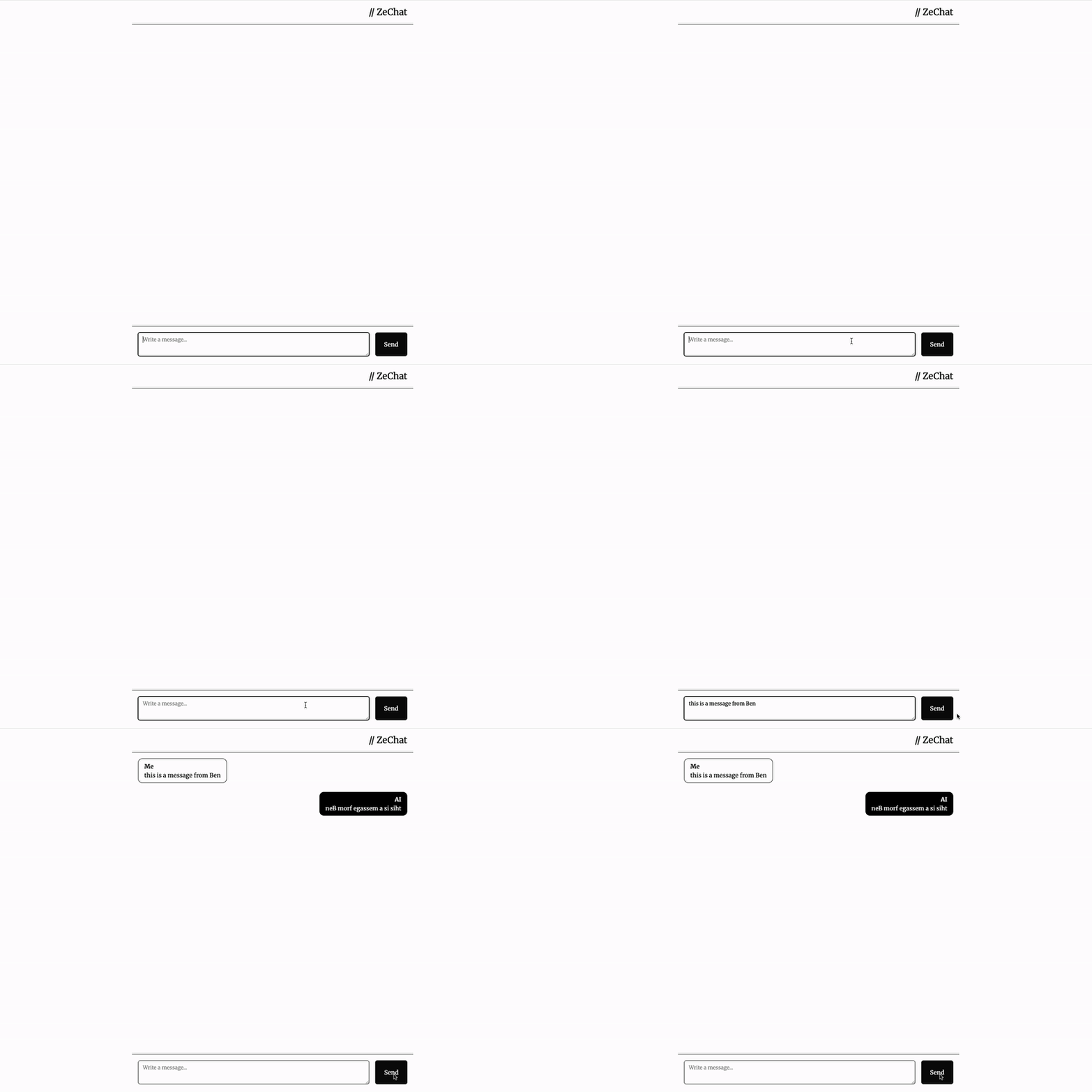
And guess what, HTMX will take care of sending/receiving the messages! This is what the result will look like:
Overview
The flow is the following:
- User inputs a query in a textarea
- This textarea is wrapped in a form, which will send a POST request to the server with the
queryparameter. - The backend receives the request, does something with the
query(in real life, we can use a LLM to answer the query). In our case, for demo purposes, we will just reply by reverting the query letter by letter. - The backend wraps the response in an HTMLResponse (not JSON!)
- In our form, HTMX tells the browser where to insert the response, as shown in the
hx-target, and how to swap it with the current DOM
And this is all. So let’s begin!
Backend
We will define a /send route that expect a query string from the frontend, inverts it, and sends it back in a <li> tag.
from fastapi import FastAPI, Request, Form
from fastapi.templating import Jinja2Templates
from fastapi.responses import HTMLResponse
import asyncio
import time

app = FastAPI()
templates = Jinja2Templates("templates")

@app.get("/")
async def root(request: Request):
    return templates.TemplateResponse(request, "simple_chat_sync.html")


@app.post("/send")
async def send_message(request: Request, query: str=Form(...)):
    message = "".join(list(query)[::-1])
    html = f"<li class='mb-6 justify-end flex'><div class='max-w-[70%] bg-black text-white rounded-xl px-4 py-2'><div class='font-bold text-right'>AI</div><div>{message}</div></div></li>"
    return HTMLResponse(html)
Frontend
On the frontend side, we define a simple HTML page using Tailwind CSS and HTMX:
<!doctype html>
<html>

<head>
  <meta charset="UTF-8" />
  <meta name="viewport" content="width=device-width, initial-scale=1.0" />
  <script src="https://cdn.jsdelivr.net/npm/@tailwindcss/browser@4"></script>
  <link rel="stylesheet" href="https://cdnjs.cloudflare.com/ajax/libs/highlight.js/11.11.1/styles/default.min.css">
  <script src="https://cdnjs.cloudflare.com/ajax/libs/highlight.js/11.11.1/highlight.min.js"></script>
  <script src="https://cdn.jsdelivr.net/npm/[email protected]/dist/htmx.min.js"
    integrity="sha384-/TgkGk7p307TH7EXJDuUlgG3Ce1UVolAOFopFekQkkXihi5u/6OCvVKyz1W+idaz"
    crossorigin="anonymous"></script>
  <script src="https://cdn.jsdelivr.net/npm/[email protected]"
    integrity="sha384-A986SAtodyH8eg8x8irJnYUk7i9inVQqYigD6qZ9evobksGNIXfeFvDwLSHcp31N"
    crossorigin="anonymous"></script>
  <link rel="preconnect" href="https://fonts.googleapis.com">
  <link rel="preconnect" href="https://fonts.gstatic.com" crossorigin>
  <link href="https://fonts.googleapis.com/css2?family=Merriweather:[email protected]&display=swap" rel="stylesheet">

  <style>
    body {
      font-family: "Merriweather";
    }
  </style>
</head>

<body class="flex w-full bg-white h-screen">
  <main class="flex flex-col w-full md:w-3/4 lg:w-1/2 pb-4 justify-between items-left mx-auto ">
    <header class="border-b p-4 text-2xl text-right">
      // ZeChat
    </header>
    <div class="mb-auto max-h-[80%] overflow-auto">
      <ul id="chat" class="rounded-2xl p-4 mb-16 justify-start">

      </ul>
    </div>

    <footer class="p-4 border-t">
      <form id="userInput" class="flex max-h-16 gap-4" hx-post="/send" hx-swap="beforeend" hx-target="#chat"
        hx-trigger="click from:#submitButton" hx-on::before-request="
                htmx.find('#chat').innerHTML += `<li class='mb-6 justify-start flex'><div class='max-w-[70%] border border-black rounded-xl px-4 py-2'><div class='font-bold'>Me</div><div>${htmx.find('#query').value}</div></div></li>`;
                htmx.find('#query').value = '';
                ">
        <textarea id="query" name="query"
          class="flex w-full rounded-md border border-input bg-transparent px-3 py-2 text-sm shadow-sm placeholder:text-muted-foreground focus-visible:outline-none focus-visible:ring-1 focus-visible:ring-ring disabled:cursor-not-allowed disabled:opacity-50 min-h-[44px] max-h-[200px]"
          placeholder="Write a message..." rows="4"></textarea>
        <button type="submit" id="submitButton"
          class="inline-flex max-h-16 items-center justify-center rounded-md bg-neutral-950 px-6 font-medium text-neutral-50 transition active:scale-110">Send</button>

      </form>
    </footer>
  </main>
</body>

</html>
Let’s have a closer look the <form> tag. This tag has several attributes, so let’s take a minute to review them:
hx-post="/send": It will make a POST request to the/sendendpoint.hx-trigger="click from:#submitButton": This means the request will be triggered when thesubmitButtonis clickedhx-target="#chat": This tells the browser where to put the HTML response. In that case, we want the response to be appended to the list.hx-swap="beforeend": The hx-target tells where to put the content, the hx-swap tells HOW. In that case, we want the content to be added before the end (so after the last child)
The hx-on::before-request is a little bit more complex, but can be explained easily. It basically happens between the click and the moment the request is sent. It will add the user input the bottom of the list, and clear the user input. This way, we get a snappy user experience!
A Better chat with Streaming and SSE
What we built is a very simple yet functional chat, however if we want to plug a LLM, we might have some times when the response from the server takes a long time. The way our current chat is built is synchronous, meaning nothing will happen until the LLM is finished writing. Not a great user experience.
What we need now is streaming, and a real LLM to have a conversation with. And this is Part 2.